EazyDraw Store Support Contact SiteMap
Hot News Screen Shots Applications Features Testimonials Gallery Download Buy Now
Previous Next
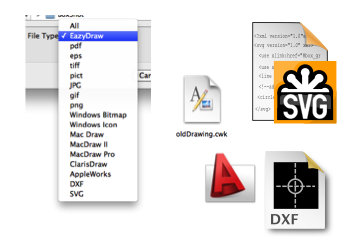
Import Graphic Formats
Vector- PDF, EPS, DXF, SVG
Bitmap- TIFF, JPEG
Web- PNG, GIF
Windows- BMP, ICO
Classic- PICT
MacDraw (II and Pro)
ClarisDraw
AppleWorks 6
Full Pasteboard support
Example of converting a Claris Draw drawing to a native EazyDraw drawing.

Full Import of the Classic Formats:

Full import of MacDrawII, MacDrawPro, ClarisDraw, and AppleWorks 6.0. Complete editable vector graphic import that conserves, layers, colors, patterns, gradients - all native content and accents. Read Claris Draw libraries directly into EazyDraw as EazyDraw vector graphic libraries. Proven import, used by 1000s of users to bring large complex drawings into OS X.

Configure Pasteboard Actions:

Use the Copy and Paste order preferences panel to manage how graphic content is pasted into EazyDraw. This is especially important with older applications like Microsoft Word and PowerPoint that do not obey OS X conventions when providing content via the pasteboard. These settings allow you to trick the sending application into providing high quality vector content, or to have EazyDraw actively probe the sending application to provide the best graphic format. This pasteboard control is provided for the management of both copying to EazyDraw and pasting from EazyDraw.

Ungroup PDF and PICT:

Ungroup support provided for PDf and PICT vector content. This capability allows editing of vector content as native EazyDraw vectors. Works with content obtained from saved files or via the OS X system pasteboard. If editing is not needed, keep the PDF or PICT as a vector image, printed and display images maintain vector quality even under zoom or expanded size.

The World-Your Library
Drag and drop from any web browser directly into EazyDraw. EazyDraw supports import from the commonly used web graphic formats, this means that you have a wide range of readily available content to assist your creative activities.
AppleWorks 6
With AppleWorks on life support, EazyDraw provides an excellent migration path to Apple's new iWork workflow. EazyDraw is a modern OS X Cocoa application, so it works as full fledged team player with Keynote, and the full iWork suite.
SVG
Scalable Vector Graphics - 6 Profiles supported. Import original vector art from other platforms (Linux and Windows) and Adobe Illustrator. All content converted to EazyDraw native constructs. Capture open original vector content on the internet, Wikipedia and Vendor web-sites.
EazyDraw download is a 13 meg universal binary optimized for both the Intel and PowerPC Mac processors, run on Leopard or Tiger, Panther and Jaguar version available
The download is a disk image file (dmg), its size is 23 Meg.

PDF:

Adobe Portable Document Format (PDF) is the native file format of the Adobe Acrobat family of products. OS X's core graphic's and text processing technology is built on these same PostScript data models. In many ways PDF is the native file format for OS X. The important thing to you the user is that PDF is a vector format, not a bitmap. EazyDraw conserves the vector quality of PDF content that you open or add to an EazyDraw drawing.

Filling Out PDF Forms:

Filling out PDF forms is a task well suited to EazyDraw. Open or include the form in an EazyDraw drawing. Then just type or draw over the included image of the form. If you are familiar with using layers, it is good to place the form on one layer while you draw and type your information on a different layer -- over the form. The technique is great for example when doing your taxes. It is very easy to add your information, you have full control over the placement, size, font or even include circles or x's or other small graphics. If the form changes the next time it is required, remove the old form, add the new one, and do some re-arranging of your information.

Edit or Ungroup PDF:

PDF graphics can be converted to native EazyDraw vector content. Ungroup PDF, is used to convert a PDF graphic to a native EazyDraw group of components, Bezier paths, text, and bitmaps. Keep in mind that PDF is a "Pen-Ink to Paper" file format designed primarily for presenting graphic content to printers. This means that while the converted EazyDraw graphics may look the same, they will likely be constructed in inefficient and counter intuitive ways. One should not ungroup PDF content unless it is truly needed.

Working With PICT:

PICT is a legacy (read: old and not well supported) graphic file format common on older, early 1990's applications. EazyDraw provides support for PICT - primarily as a recovery avenue and for working with Microsoft Office and PowerPoint. EazyDraw supports Ungroup for PICT and this can be a valuable tool in recovering and converting old graphic content. While it may not always work fully, many users have successfully recovered some quite elaborate drawing content with this tool. Keep in mind that frequently PICT content is actually a bitmap image in a PICT wrapper. Before investing a lot of time attempting to recover a PICT, try to get a zoomed image and verify that it is a vector PICT, if it is a bitmap converting it will be of no avail.

Photos Too:

Import your photos or scanned content directly into EazyDraw. EazyDraw's full range of drawing capability is available to manage your still photographic content. Crop, tint, rotate, skew, fade, all available for your post-shoot work-ups.

AutoCad DXF:

Compliant with the specifications for versions 2004, 2000/LT2000, and RT12/LT2. Import layers, hatch patterns, dimensions, arrows, dashed lines, attributed text, symbols, nested groups. All content converted to EazyDraw native constructs.

This web page designed, created and published entirely with BBEdit and EazyDraw.
EazyDraw, a Dekorra Optics LLC enterprise
Contact: ph +1 608 444 5245 fax: +1 608 635 2124 mail: N5040 Beach Garden Road, Poynette, WI USA.
Copyright © 2010, All rights reserved.